Showing posts with label PROC MEANS. Show all posts
Learning SAS: How to create Summary Dataset using PROC MEANS
As we mentioned in the previous post, PROC MEANS is our handy option to create a new summary dataset that can be used in other data steps or Procedures. Here we'll show how to create a summary dataset using PROC MEANS.
Problem:
Using the SAS data set College, create a summary data set (call it Class_Summary) containing the n, mean, and median of ClassRank and GPA for each value of SchoolSize. Use a CLASS statement and be sure that the summary data set only contains statistics for each level of SchoolSize. Use the AUTONAME option to name the variables in this data set.
Solution:
Output:

Problem:
Using the SAS data set College, create a summary data set (call it Class_Summary) containing the n, mean, and median of ClassRank and GPA for each value of SchoolSize. Use a CLASS statement and be sure that the summary data set only contains statistics for each level of SchoolSize. Use the AUTONAME option to name the variables in this data set.
Solution:
/* create summary dataset from proc means */
/* NWAY to display only the Schoolsize level type */
proc means data=A15001.A01_College NOPRINT NWAY;
    CLASS SchoolSize;
    var ClassRank GPA;
    Output out=A15001.A01_Class_Summary N=Mean=Median= /Autoname;
run;

Title 'Grouped Summary Statistics of ClassRank & GPA by Schoolsize';

proc print data=A15001.A01_Class_summary;
run;

Title;
Output:

Learning:
- How to efficiently use PROC MEANS to create a summary dataset
- What's the purpose of NWAY option in PROC MEANS
- How to automatically name the variables in the newly created Summary dataset
Learning SAS: Summarizing Data (PROC MEANS)
We've seen the basic data manipulation options with SAS in our previous blogpost and it's time for us to understand how to report those processed data. And the first think that comes in this journey is PROC MEANS.
People think of PROC MEANS just as a way to calculate summary statistics of numeric values but these procedures are much more versatile and can be used to create summary data sets that can then be analyzed with more DATA or PROC steps.
Problem 1:
Using the SAS data set College, compute the mean, median, minimum, and maximum and the number of both missing and non-missing values for the variables ClassRank and GPA. Report the statistics to two decimal places. (Ref: Learning SAS by Example, Ron Cody, Chapter 16, Problem 1)
Input Data:

Solution:
Title 'Summary Statistics of ClassRank & GPA with two decimal pts';

proc means data=A15001.A01_College Mean Median Min Max NMiss N Maxdec=2;
    var ClassRank GPA;
run;

Title;
Output:

Problem 2:
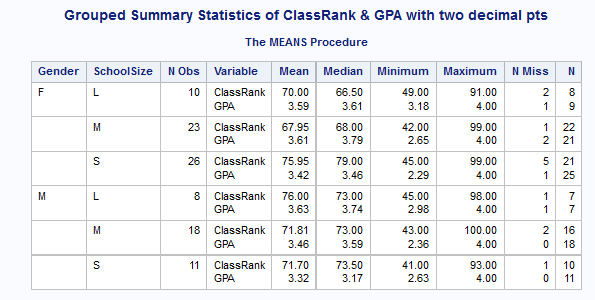
Repeat Problem 1, except compute the desired statistics for each combination of Gender SchoolSize. Do this twice, once using a BY statement, and once using a CLASS statement.
Solution:
Title 'Grouped Summary Statistics of ClassRank & GPA with two decimal pts';

proc means data=A15001.A01_College Mean Median Min Max NMiss N Maxdec=2;
    Class Gender SchoolSize;
    var ClassRank GPA;
run;

Title;

/* Grouping with BY */
proc sort data=A15001.A01_College out=sorted_college;
    by Gender Schoolsize;
run;

Title 'Grouped Summary Statistics of ClassRank & GPA with two decimal pts';

proc means data=sorted_college Mean Median Min Max NMiss N Maxdec=2;
    by Gender SchoolSize;
    var ClassRank GPA;
run;

Title;
Output:

Learning:
- Different ways of using PROC MEANS
- Various options of PROC MEANS like MAXDEC
- Grouping PROC MEANS Summary statistics


