Showing posts with label PROC FREQ. Show all posts
Learning SAS: How to sort variables while displaying the frequency output?
Sometimes it's not desirable just to display the output of the PROC FREQ as it is. As an analyst, sometimes our organization would require us to tweak it a bit.

Problem:
Using the SAS data set Blood, produce a table of frequencies for BloodType, in
frequency order. (17:7)
Solution:
/*Using the SAS data set Blood, produce a table of frequencies for BloodType, in
frequency order.*/


TITLE 'FREQUENCY OF CHOLESTROL GROUPED ORDERED BY INPUT DATA';
PROC FREQ DATA=A15001.A01_BLOOD ORDER=DATA;
 TABLE BLOODTYPE;
RUN;

TITLE 'FREQUENCY OF CHOLESTROL GROUPED ORDERED BY INPUT FREQUENCY';
PROC FREQ DATA=A15001.A01_BLOOD ORDER=FREQ;
 TABLE BLOODTYPE;
RUN;
TITLE;


Output:

Learning:
- How to change the order of variables displayed in the PROC FREQ Output
Learning SAS: How to handle missing values while counting frequencies
Missing values are very obvious in any raw dataset and it's very important for an analyst to know to how to handle them. Especially while counting frequencies, Missing values can give misleading figures.
Problem:
Using the data set Blood, produce frequencies for the variable Chol (cholesterol). Use a format to group the frequencies into three groups: low to 200 (normal), 201 and higher (high), and missing. Run PROC FREQ twice, once using the MISSING option, and once without. Compare the percentages in both listings.
Solution:
Output:
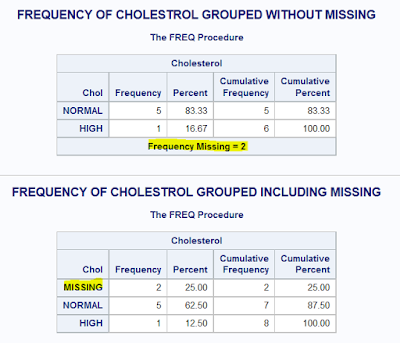
Problem:
Using the data set Blood, produce frequencies for the variable Chol (cholesterol). Use a format to group the frequencies into three groups: low to 200 (normal), 201 and higher (high), and missing. Run PROC FREQ twice, once using the MISSING option, and once without. Compare the percentages in both listings.
Solution:
PROC FORMAT;
 VALUE CHOLGRP
  LOW-200 = 'NORMAL'
  201-HIGH = 'HIGH'
  OTHER = 'OTHERS';
RUN;

TITLE 'FREQUENCY OF CHOLESTROL GROUPED WITHOUT MISSING';
PROC FREQ DATA=A15001.A01_BLOOD;
 TABLE CHOL;
 FORMAT CHOL CHOLGRP.;
RUN;


PROC FORMAT;
 VALUE CHOLGRP
  LOW-200 = 'NORMAL'
  201-HIGH = 'HIGH'
  . = 'MISSING'
  OTHER = 'OTHERS';
RUN;

TITLE 'FREQUENCY OF CHOLESTROL GROUPED INCLUDING MISSING';
PROC FREQ DATA=A15001.A01_BLOOD;
 TABLE CHOL /MISSING;
 FORMAT CHOL CHOLGRP.;
RUN;
TITLE;
Output:

Learning:
- How to group variables while displaying the frequency using PROC FREQ
- How to use user-defined formats in PROC FREQ
- How to handle missing values in PROC FREQ
Learning SAS: Counting Frequencies - PROC FREQ
As PROC MEANS is very helpful in performing various operations on Numeric variables, PROC FREQ can be used to count frequencies of both character and numeric variables,
in one-way, two-way (Crosstabs/Contingency Tables), and three-way tables.
Problem 1:
Using the SAS data set Blood, generate one-way frequencies for the variables Gender, BloodType, and AgeGroup. Use the appropriate options to omit the cumulative statistics and percentages (17.1)
Input:

Solution:
Output:

in one-way, two-way (Crosstabs/Contingency Tables), and three-way tables.
Problem 1:
Using the SAS data set Blood, generate one-way frequencies for the variables Gender, BloodType, and AgeGroup. Use the appropriate options to omit the cumulative statistics and percentages (17.1)
Input:

Solution:
Title 'Frequency of Gender BloodType Age group without Cum.Freq. and %';
PROC FREQ DATA=A15001.A01_BLOOD;
 TABLE GENDER BLOODTYPE AGEGROUP /NOCUM NOPERCENT;
RUN;
Title;
Output:

Learning:
- How to use PROC FREQ to build a one-way frequency table
- Different Options of PROC FREQ like NOCUM and NOPERCENT


